01 — ROI Pay-per-call reporting
See what actually paid back.
A pay-per-call team went from 3 hours of daily reporting to zero. Three ad channels plus Ringba, one Slack readout.
Reads from
We speak Ringba.


Pay-per-call





Call tracking




Screens
The actual update.
-
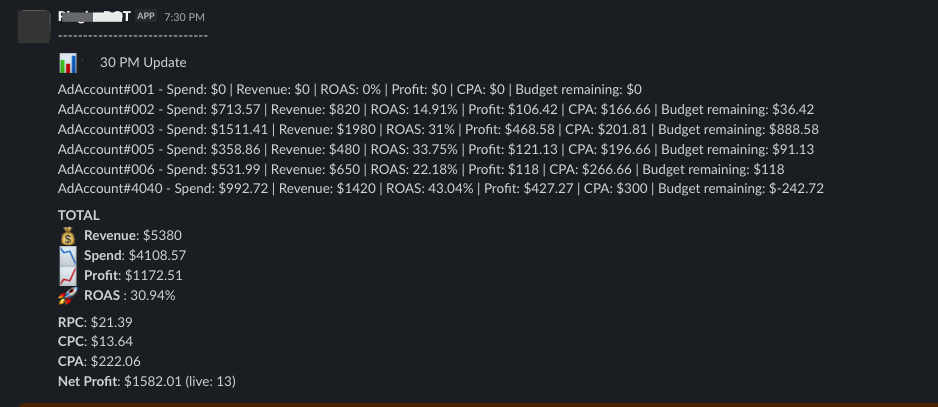
The Slack update. Every account, then the totals.
How I use it
I don’t keep Ads Manager open.
I’ve run almost $10 million in ad spend over the past three years. I can’t keep accounts open all day and sit there refreshing.
Google’s UI is late. The API is not. When I’m driving, at dinner, or away from the desk, Slack tells me if an account is profitable. I can pause a burst or scale a winner without opening a laptop for five minutes.
CPC and CPA sit in the same readout. I don’t switch tabs to check revenue or profit, or do the math every few minutes. That time goes back to the work.
Danyal Jamil, media buyer
Walkthrough
How ROI looks in Slack.
Drop a Loom share link on this block when you have one.
Founding price
First 50 shops.
$200 the first month, setup included. $100 a month after. After 50, new shops pay $150 a month.
-
$200
First month
Setup included. We wire Slack to the stack you already run.
-
$100
Then each month
Spend, payout, and profit in Slack. Refresh every 15 minutes.
-
+$25
Extra ad accounts
Ten ad accounts are in. Each one after that is $25 a month.
One call platform: Ringba, or CallGrid, TrackDrive, Retreaver, Phonexa. Plus Meta, Google, and TikTok.
We read spend and payouts. We never bid. You can revoke access.
For shops already buying or selling inbound calls. Not for students, GMB work, or people still getting into pay-per-call.
30 minutes
Book a meeting.
We’ll look at your stack. You share read-only access. First Slack update the same week.
Book a meeting